🔥 Trending 🎞️ Live Wallpapers ✨ 4K 🌸 Anime 🌙 Dark ⚫ OLED 📱 AMOLED 🖼️ Backgrounds 🚗 Cars 🎮 Gaming 🌿 Nature 🚀 Space 🎀 Anime Girl 🖥️ 1920×1080 🌃 Cyberpunk 🎄 Christmas
Home > Sci-fi Fantasy > Lone Samurai at Sunset Live Wallpaper

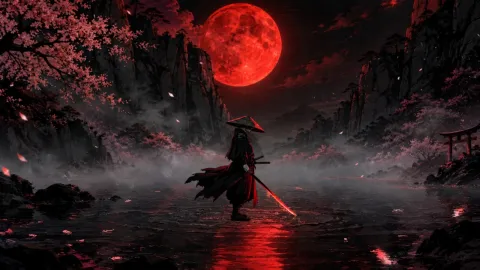
Lone Samurai at Sunset Live Wallpaper

Next wallpaper
Advertisement
0:00 0:00
Description
Sci-fi Fantasy

Lone Samurai at Sunset Live Wallpaper is a stunning computer and mobile background available in Sci-fi Fantasy category. The original resolution of the video is 4096x2304, with a file size of 28.56 MB.

A lone samurai stands on a rocky cliff overlooking a serene misty lake, gazing at a majestic mountain under a vibrant red sunset. In the distance, a traditional Japanese temple glows warmly near the water.

This atmospheric and peaceful scene brings a touch of ancient Japanese folklore to your screen. It is perfect as a calming live wallpaper for your desktop background or mobile device.

Advertisement
DOWNLOAD
Wallspace for macOS
Instantly set this wallpaper directly in the Wallspace app.
One Game Launcher
One Game Launcher provides a centralized place for your game library easily accessible by gamepad or keyboard & mouse. OGL is available as the game bar widget (compact and desktop mode) and regular app from the start menu.
Open in Editor
Set on Browser Tab:
Advertisement

Use Cases

This 4096x2304 Sci-fi Fantasy video wallpaper is perfect for:

Desktop or gaming PC wallpaper
4K and ultra-wide monitor
Large TV or digital signage
Streaming or overlay panel
YouTube or Twitch background
Wallpaper Engine or Lively
Video editing B-roll
Presentation or event backdrop

Compatibility

This file uses the HEVC codec inside an MP4 container, ensuring maximum compatibility across all modern devices and operating systems.

Windows 10 / 11 Wallpaper Engine, Lively Wallpaper, VLC
macOS 12 Monterey+ IINA, QuickTime, Wallpaper app
Linux Ubuntu 20.04+ VLC, mpv, Komorebi
Android 6.0+ Video wallpaper apps
Smart TV / Fire TV USB or streaming playback

How to Use

1

Click the Download button above to save the video file.

2

On Windows: install Wallpaper Engine or the free Lively Wallpaper app, then drag-and-drop the file in.

3

On macOS: use the free IINA player or any wallpaper app from the App Store.

4

For Wallpaper Engine users: add to your library and enable "Loop" and "Mute" in the properties.