Modern Circular Weather Clock Widget
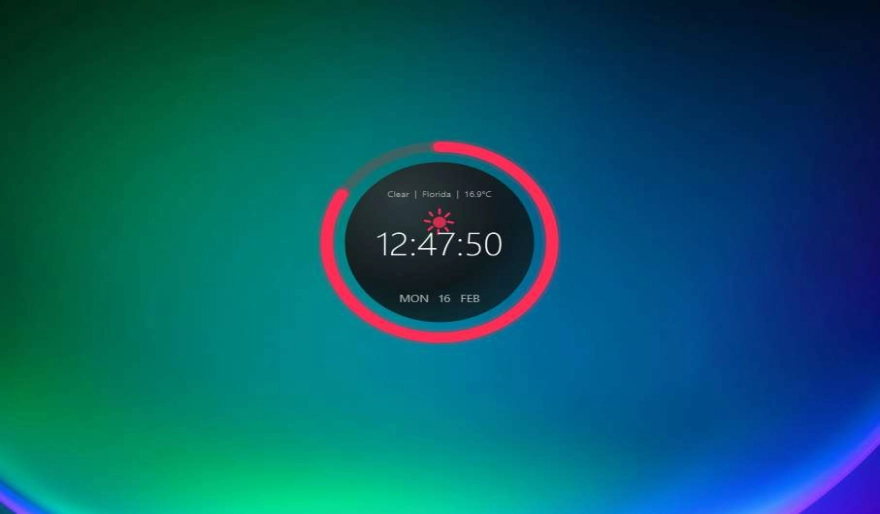
A sleek circular desktop clock for Windows with live weather, smooth animations (sun, clouds, rain, snow, thunder), and real-time customization. Designed to be lightweight, always-on-top, and perfect for a clean setup.
Click-through mode: When enabled, the widget ignores mouse clicks. To open settings, use Ctrl + Alt + S.
Key Features
Uses Open-Meteo weather + geocoding (no key required). Set your location and units (°C/°F).
Smooth animations for sunny, cloudy, rain, snow, fog, and thunderstorm lightning effects.
Text auto-scales and elides to fit the circle. Clean spacing at different sizes and resolutions.
Change size, opacity, colors, fonts, ring style, 24h time, seconds, and see updates instantly.
Enable click-through for a true overlay. Open settings anytime with Ctrl + Alt + S.
Automatically saves the last screen position and all preferences and restores them on next launch.
Installation Guide
- Download the .zip package below.
- Open the DesktopHut Application.
- Go to the "Widgets" tab.
- Click "+ Add Widget" and select the downloaded file.
- Press Play to launch. The widget will remember its settings and position automatically.